Connecting a smart garage door opener to your home network often seems straightforward until an app freezes, an LED flashes an unexpected color, or a mesh router drops the signal. Manufacturer guides assume ideal conditions, but real-world setups must navigate dual-band network steering, mobile privacy blocks, and legacy hardware limitations.
Connecting Major Garage Door Opener Brands to Wi-Fi
Published: Oct 30, 2026
Pre-Flight Diagnostic & Mobile OS Requirements
Over 70% of setup failures occur before the opener even attempts to connect to your router. Modern mobile operating systems actively block local network handshakes during hardware onboarding through security features.
Before opening your manufacturer’s app, complete these mobile configurations:
- Disable iCloud Private Relay and Limit IP Address Tracking on iOS devices.
- Grant full Local Network Access and Location Services permissions to the app.
- Temporarily disable Cellular Data to prevent your smartphone from dropping local Wi-Fi handshakes.
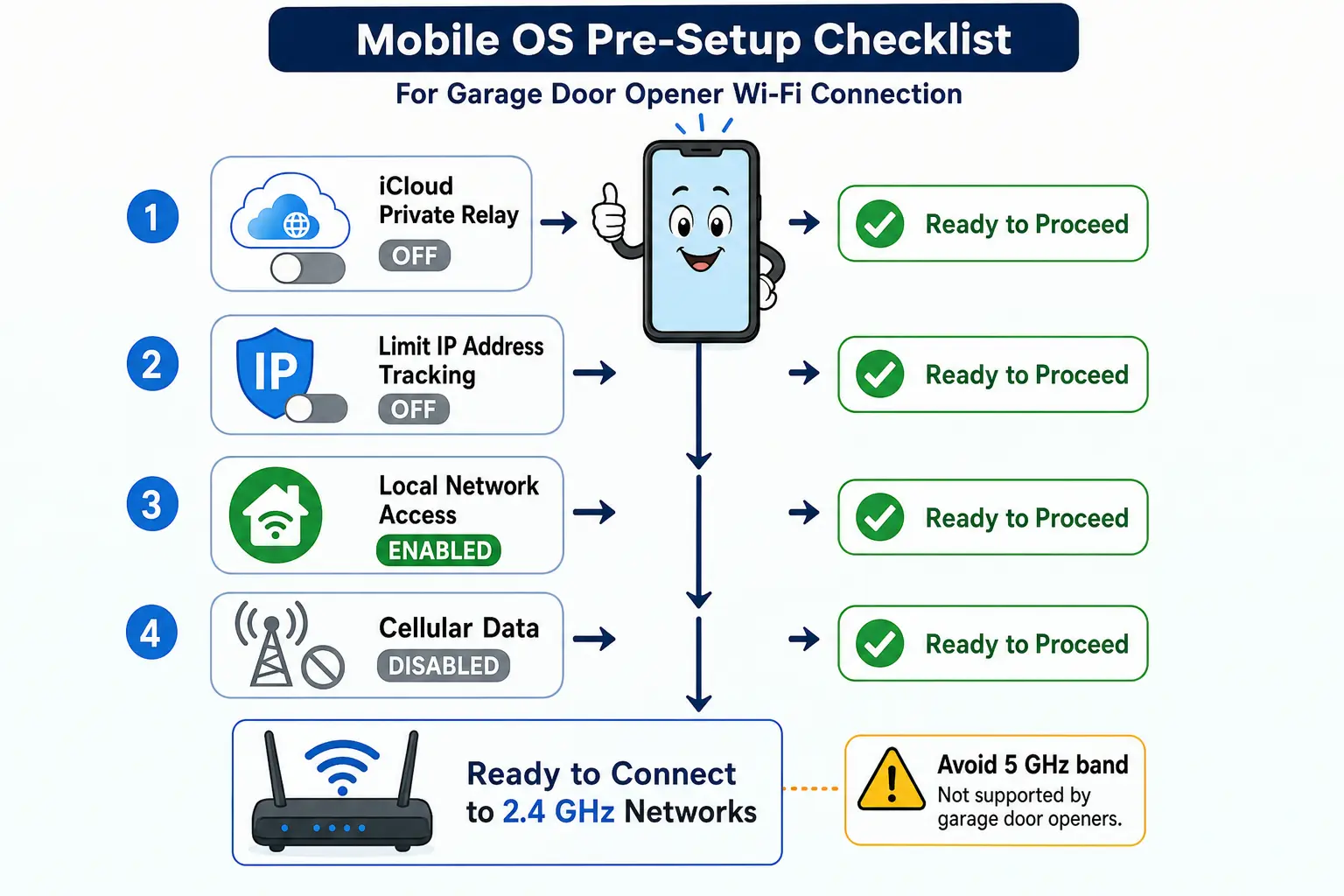
Reviewing the ultimate checklist for smart garage door technology ensures your hardware and mobile settings are fully prepared before pairing.
Still stuck? Get it fixed today.
24/7 emergency service from licensed local technicians.
Chamberlain & LiftMaster myQ Configuration
Whether configuring built-in myQ openers or external 828LM gateways, proper identification of your wall control interface (Smart Control Panel vs. Motion Sensor Push Button) is critical. For detailed hardware assembly, consult our guide on liftmaster opener installation.
When changing Wi-Fi credentials or setting up a new unit, press the Learn button or Adjustment arrows until the main LED indicator shifts color. If the smartphone app hangs during discovery, bypass it by connecting directly to the opener’s internal access point (myQ-XXX) in your Wi-Fi settings and navigating to 192.168.10.1 or setup.myqdevice.com in a web browser.
Note on Factory Resets: If your opener features an internal battery backup, unplugging the AC power cord alone will not reset the board. You must disconnect the 12V battery terminal behind the light lens cover to perform a complete wipe.
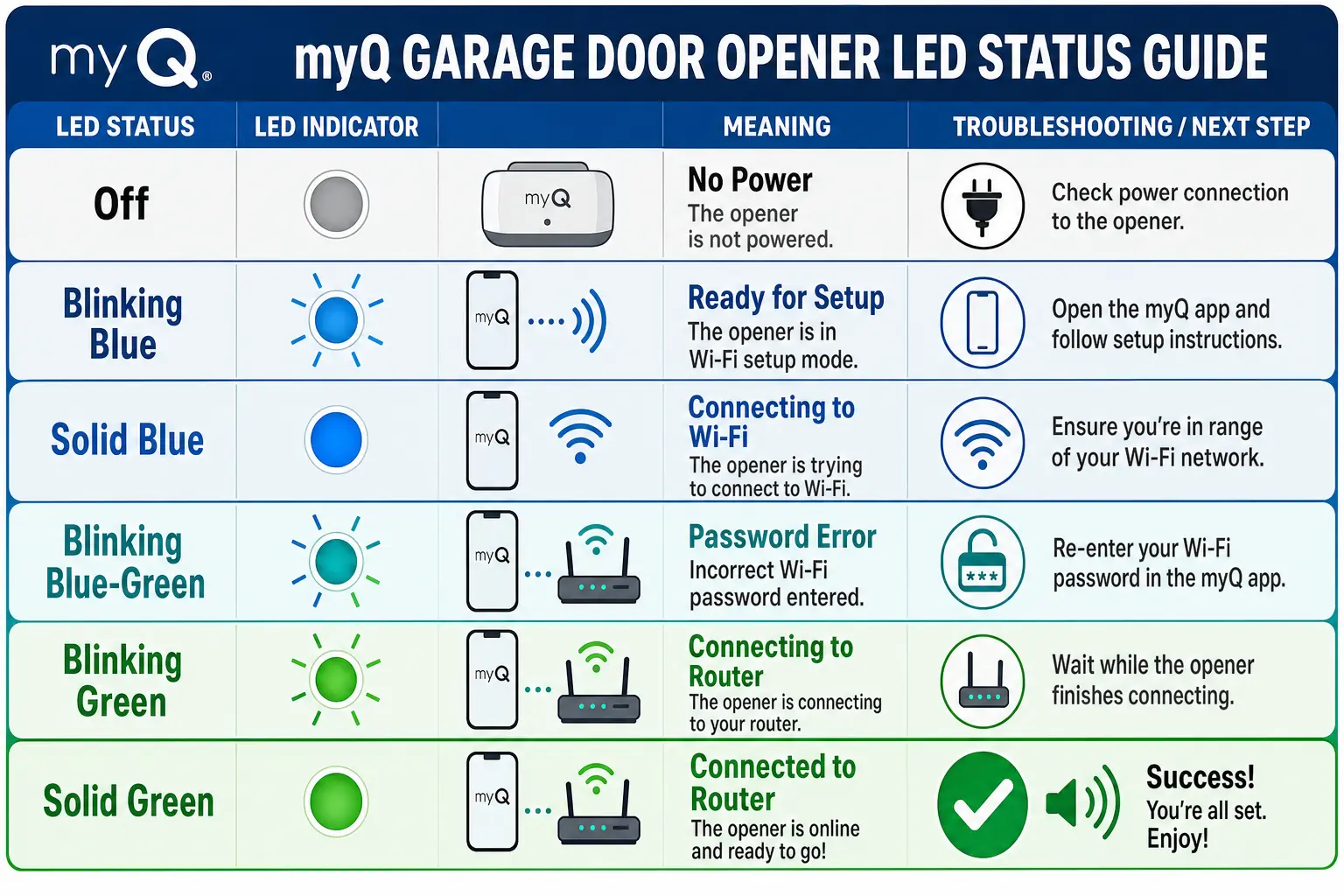
For specific button sequences across control panels, see our resource on how to program liftmaster garage door opener.
Genie Aladdin Connect & Ryobi Retrofit Solutions
Genie Aladdin Connect units require pairing the integrated Wi-Fi module alongside calibrating the Door Position Sensor (DPS). Ensure the DPS is mounted correctly on the top panel before initiating Wi-Fi configuration via the Aladdin app.
For homeowners dealing with discontinued Ryobi GDO systems where official app support has ended, the opener hardware remains functional. If your ryobi gdo wont connect, you can retrofit the unit by wiring a third-party smart controller (such as Meross MSG100, Tailwind iQT3, or a myQ Smart Hub) to the dry contact wall control terminals, preserving modular accessories like overhead fans while restoring smartphone app capabilities.
Integrating universal controllers is ideal when seeking to connect garage door opener systems across various legacy brands.
Mesh Router Band Steering Workarounds
Smart garage door microcontrollers operate exclusively on 2.4 GHz radio bands. Modern Wi-Fi 6 mesh networks (Eero, Google Nest, Netgear Orbi) broadcast 2.4 GHz and 5 GHz under a single network name (SSID), causing setup handshakes to fail when smartphones default to 5 GHz.
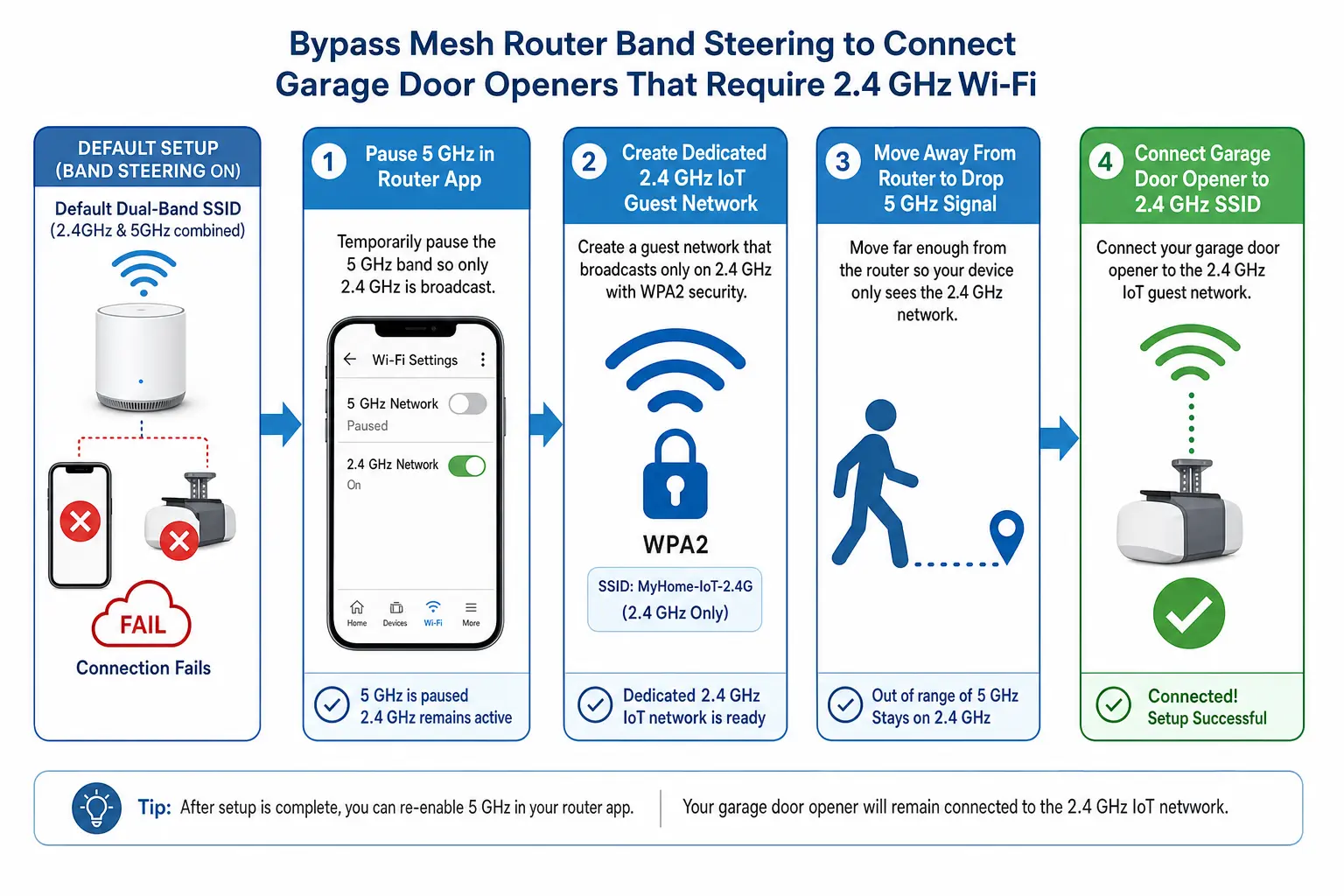
To resolve band steering conflicts:
- Temporarily pause the 5 GHz band in your router’s mobile app settings during pairing.
- Walk ~50 feet away from the router to naturally drop the 5 GHz signal while maintaining a stable 2.4 GHz connection.
- Establish a dedicated 2.4 GHz Guest Network using WPA2-Personal encryption specifically for IoT devices.
For step-by-step guidance on updating network profiles after router replacements, view our wi-fi garage door setup walkthrough, or evaluate network hardware options in our overview of garage door opener vs wifi extender.
Professional Installation and Support
When hardware faults, wiring complexities, or signal range obstacles prevent successful Wi-Fi connection, expert assistance ensures long-term reliability. Schedule professional service through an established garage door opener installation service or request specialized assistance for liftmaster garage door repair.
Frequently Asked Questions
Why is my garage door opener LED light solid blue?
A solid blue light on myQ devices indicates the opener is connected directly to your smartphone via Bluetooth or local Wi-Fi, but has failed to communicate with your home router. In most cases, this is caused by entering an incorrect Wi-Fi password or your mesh router forcing your mobile device onto a 5 GHz band.
How do I factory reset a myQ opener with a battery backup?
To complete a full factory reset, hold the yellow Learn button until the LED turns off, then repeat until a beep sounds. If your unit contains a battery backup, you must unplug the main AC power supply and disconnect the internal 12V battery wire behind the lens cover to wipe stored network credentials completely.
What should I do if my Ryobi garage opener app no longer works?
Because the official Ryobi GDO server app was discontinued, phone control can be restored by wiring an aftermarket smart control gateway (such as Meross, Tailwind, or myQ Smart Control) to the opener’s wall panel terminals. This retains physical operation and modular accessories while enabling modern app integration.