main logo

Phantom Drain: The Hidden Reason Your Garage Door Remote Battery Keeps Dying


Published: Jun 23, 2026

If you find yourself constantly swapping out batteries, you might assume you have a faulty remote or a bad batch of batteries. But the real culprit is often something you can’t see—an invisible energy drain happening 24/7. It's a phenomenon known as "phantom drain" or "parasitic draw," and it's less about your remote and more about the relationship it has with your main garage door opener.

Let's pull back the curtain on why your batteries are losing the fight and what you can do about it.

Foundation: Meet the Real Power Hog - The Opener


It’s easy to think of your garage remote as being "off" until you press a button. In reality, your entire garage door system is in a state of constant readiness. Your main opener unit, plugged into the ceiling, is always "listening" for a signal from your remote. This constant listening requires a small but steady amount of electricity. This concept also explains how many watts a garage door opener uses even when it’s not in motion.
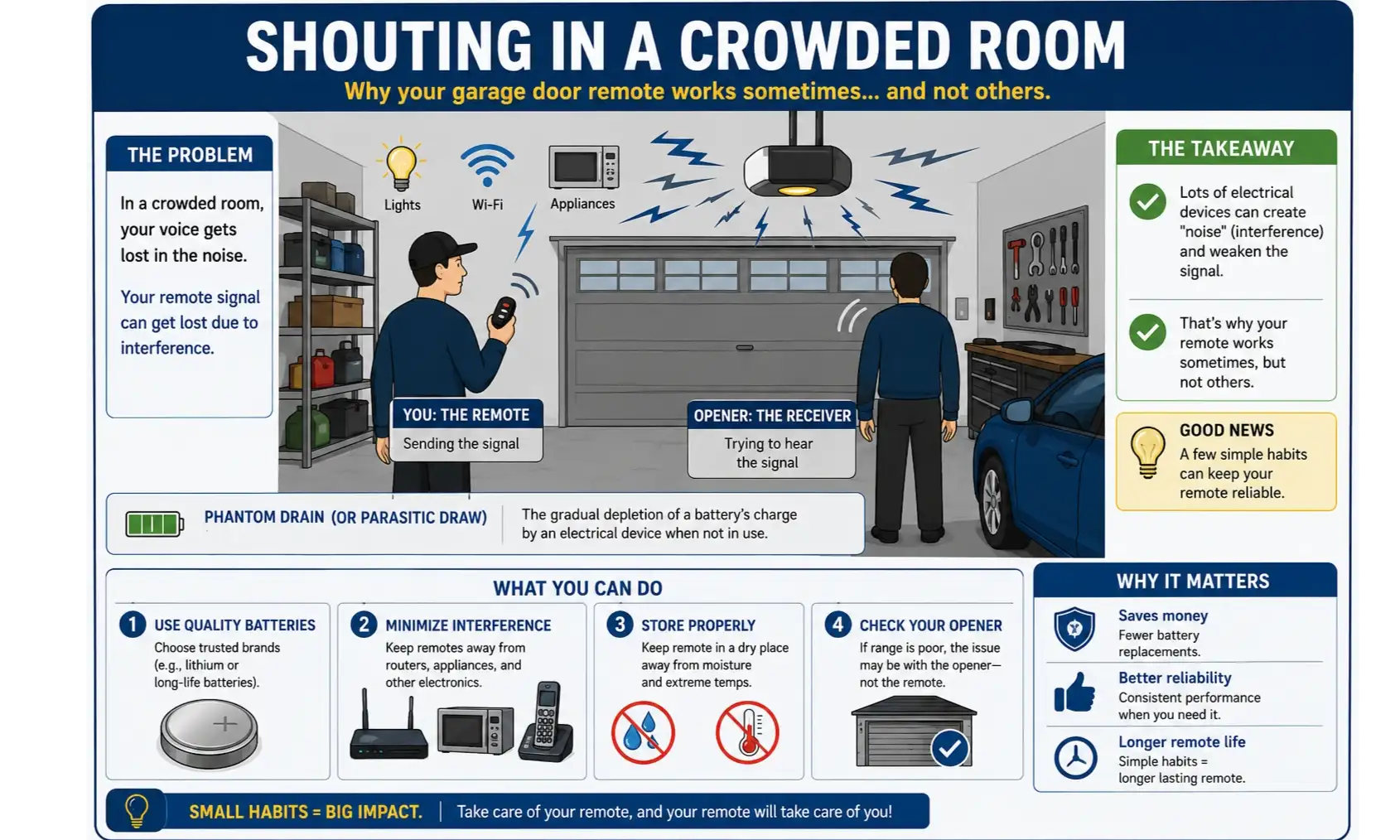
Illustration of a person shouting in a quiet room versus a crowded, noisy room to explain phantom drain in garage door remotes.
This is where phantom drain begins. For the opener to "hear" your remote, the remote has to send a signal strong enough to cut through any background noise and reach the receiver. The harder it has to work to be heard, the more battery power it consumes with every single click.

Think of it like trying to get a friend’s attention across a room.

In a quiet room, a simple "Hey!" works. But in a loud, crowded party, you have to shout to be heard. Your remote is in the same situation. If the "room" (your garage) is full of "noise" (radio frequency interference) or the "listener" (your opener's receiver) is "hard of hearing" (has a weak antenna), your remote has to "shout" by boosting its signal. That extra effort is what mysteriously drains your battery.

Illustration of a person shouting in a quiet room versus a crowded, noisy room to explain phantom drain in garage door remotes.

Building: The 3 Culprits of Battery Drain


So, what causes your remote to "shout" or otherwise waste energy? The problem rarely stems from a single source. It’s usually a combination of factors related to the remote, the environment, and the opener unit itself.
A pie chart illustrating the primary causes of garage door remote battery drain, with Signal Boost at 40%, Stuck Button at 20%, Poor Quality Battery at 15%, Temperature at 15%, and Standby at 10%.

Culprit #1: The Remote Itself (The Usual Suspects)

While not always the primary villain, the remote can have issues that contribute to a short battery life.

Stuck Buttons: A button that is even slightly depressed can cause the remote to transmit continuously, draining a new battery in a day or two. This can happen if the remote is jostled in a bag or the internal components wear out.

Low-Quality Batteries: Not all batteries are created equal. Bargain-bin batteries often have a lower capacity and can’t deliver consistent power, leading to a much shorter lifespan. Always opt for reputable brands. If you're unsure which garage door remote battery to use, check your opener's manual.

Internal Faults: Over time, the internal contacts can corrode or wear out, leading to shorts or inefficient power use.

Culprit #2: The Environment (The ‘Noise’ in the Room)

Your garage isn't a vacuum. It’s filled with invisible forces that can disrupt the signal between your remote and opener.

Radio Frequency (RF) Interference: This is the biggest environmental factor. Many modern electronics emit radio frequencies that can "jam" the signal. Common sources include LED light bulbs, cordless phones, wireless routers, and even some appliances. When this interference is present, your remote has to work much harder to send a clear signal.

Extreme Temperatures: Batteries are chemical devices, and their performance is affected by temperature. Extreme cold, a common source of winter garage door problems, can significantly reduce a battery's effective capacity.

Culprit #3: The Opener Unit (The ‘Hard of Hearing’ Listener)

This is the most overlooked cause of phantom drain. A problem with the main opener's receiver can force every remote in your home to overcompensate.

A Weak or Obstructed Antenna: The small antenna wire dangling from your opener unit is its "ear." If this wire is damaged, coiled up, or blocked by metal objects, its ability to receive the signal is drastically reduced.

Failing Receiver: Like any electronic component, the receiver board in the opener unit can degrade over time. As it weakens, it requires a stronger signal to register, putting more strain on your remote's battery. This is one of the more frustrating garage door opener antenna problems because it’s not immediately obvious.

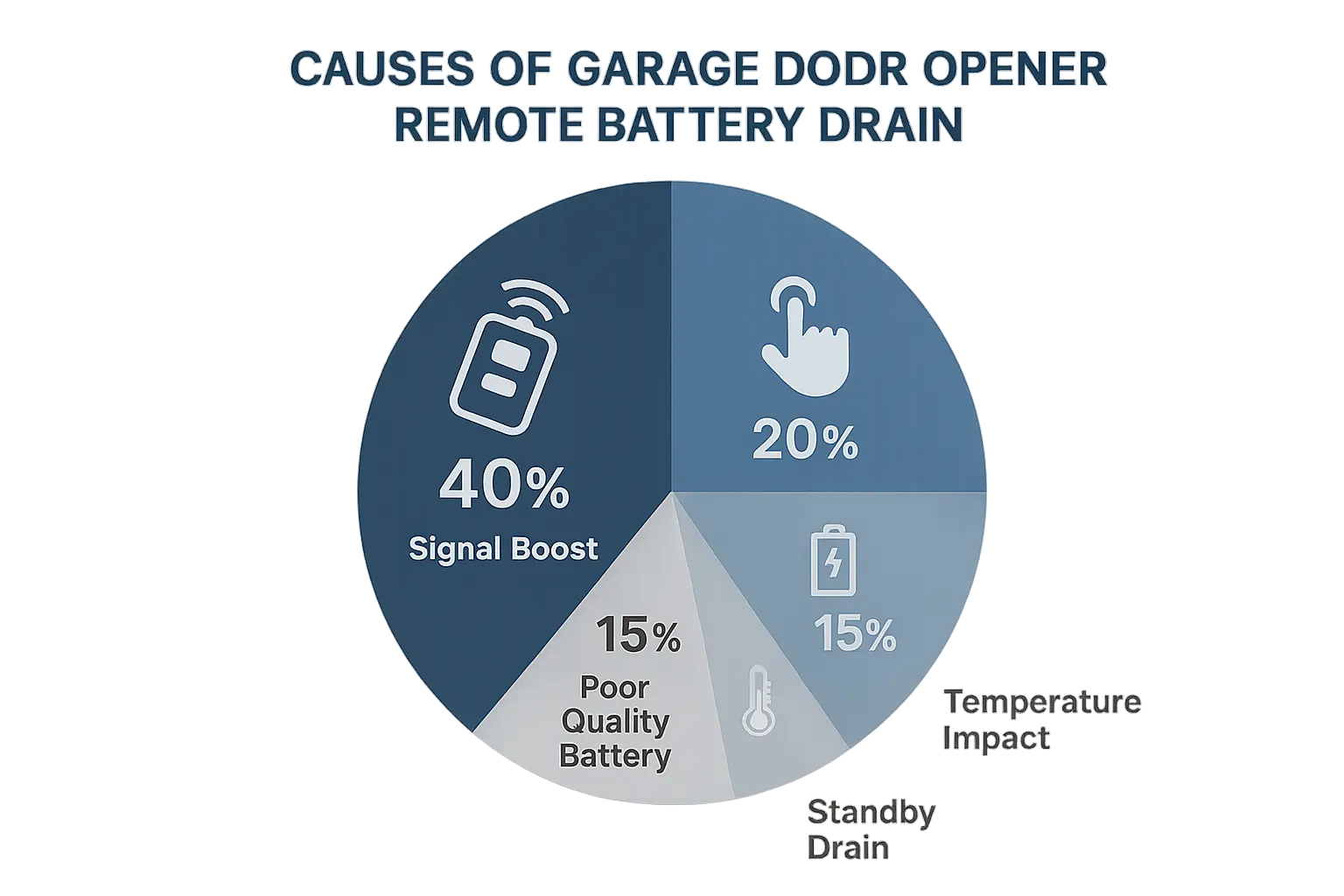
A pie chart illustrating the primary causes of garage door remote battery drain, with Signal Boost at 40%, Stuck Button at 20%, Poor Quality Battery at 15%, Temperature at 15%, and Standby at 10%.

Mastery: How to Diagnose the Drain


Now that you understand the culprits, you can start troubleshooting like a pro. Follow this simple diagnostic path from easiest to most complex to pinpoint the source of your battery drain.
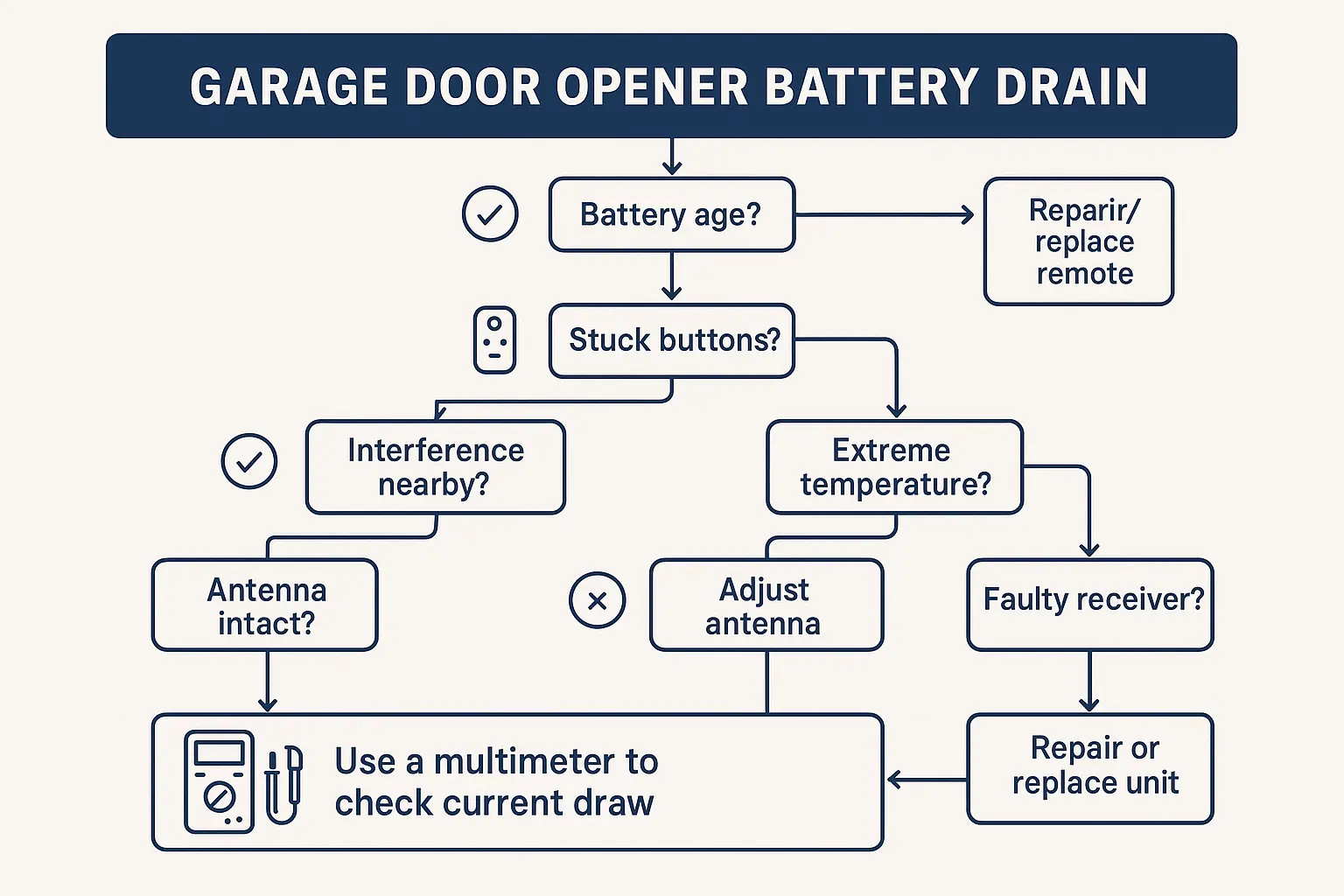
A flowchart showing a simple diagnostic path for battery drain: start with battery check, then remote inspection, then environmental scan, and finally opener check.
1. Start with the Basics: Replace the battery with a fresh one from a reputable brand. Ensure it’s seated correctly. Check that the buttons move freely and aren't stuck.

2. Inspect the Opener's Antenna: Look at the antenna wire on your main opener unit. Is it dangling straight down and free from obstructions? Is it damaged or cut? Try repositioning it for a clearer signal path.

3. Perform an Interference Audit: This is the key to identifying environmental issues. Turn off all LED lights in your garage and unplug any nearby electronics one by one. Test the remote after each item is turned off. If the remote's range and responsiveness suddenly improve, you’ve found a source of RF interference.

4. Test for Proximity: Does the remote work perfectly when you're standing right under the opener but fail from the end of the driveway? This is a classic sign of a weak signal, pointing to either significant RF interference or a problem with the opener's receiver. If you've ruled out interference, the opener is the likely cause. If you're unsure how to fix the garage door remote, it may be time to consult a professional.

A flowchart showing a simple diagnostic path for battery drain: start with battery check, then remote inspection, then environmental scan, and finally opener check.

Action: Your Long-Term Battery-Saving Plan


Preventing phantom drain is about maintaining a healthy and efficient communication link between your remote and opener. Adopt these best practices to maximize the life of your batteries.
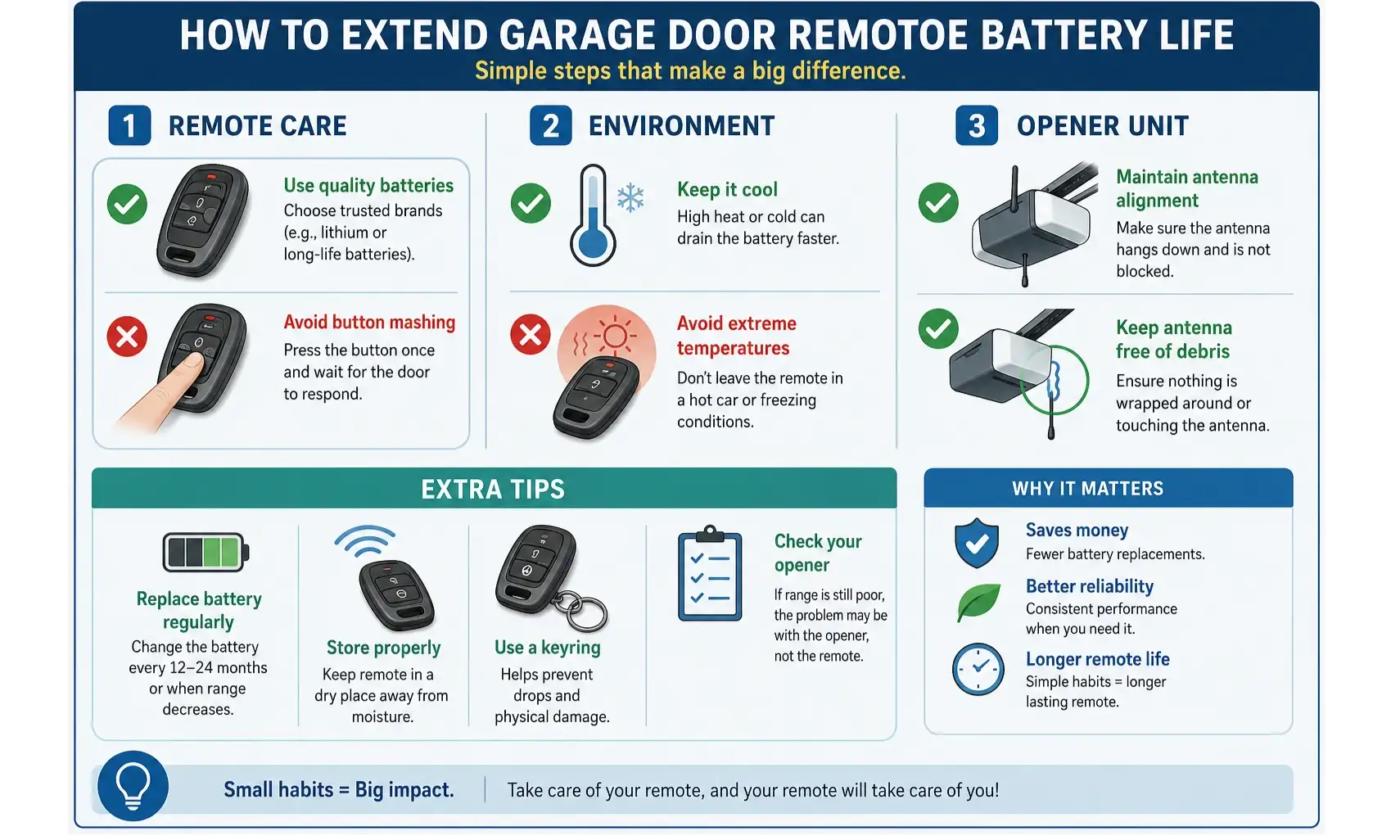
A checklist of best practices for extending garage door remote battery life, including using quality batteries, checking antenna position, minimizing RF interference, and regular remote cleaning.

  • Use High-Quality Alkaline or Lithium Batteries: They provide a stable voltage and have a longer shelf life.
  • Keep Your Antenna Clear: Ensure the opener's antenna wire hangs straight down and isn't tangled or touching any metal.
  • Upgrade Your Lightbulbs: If you identify LED lights as an interference source, switch to "garage door opener compatible" low-interference bulbs.
  • Clean Your Remote: Once a year, open the remote case and gently clean the contacts with a cotton swab and rubbing alcohol to prevent buildup.
  • Store Remotes Carefully: Avoid storing remotes in places where buttons can be accidentally pressed for long periods.
By understanding the full picture, you can move from frustration to empowerment. A dead battery is no longer a random annoyance, but a symptom you can diagnose and solve.
A checklist of best practices for extending garage door remote battery life, including using quality batteries, checking antenna position, minimizing RF interference, and regular remote cleaning.

Frequently Asked Questions About Garage Remote Batteries


How long should a garage door remote battery last?

Under normal conditions, a battery in a typical garage door remote should last at least two years. If you're replacing it more than once a year, you likely have a phantom drain issue.

Are rechargeable batteries a good choice for my remote?

Generally, no. Most rechargeable batteries (like NiMH) have a lower voltage (1.2V) than standard alkaline batteries (1.5V). This lower voltage can sometimes be insufficient for the remote to send a strong signal, ironically making the phantom drain problem worse. Stick to the battery type recommended by the manufacturer.

Can a power surge affect my remote's battery?

A power surge affects the main opener unit, not the battery-powered remote directly. However, a surge could potentially damage the opener's receiver, making it less sensitive. This would force the remote to work harder, indirectly leading to faster battery drain. For this reason, a quality battery backup garage door opener with built-in surge protection is a wise investment.

If one remote’s battery dies quickly, will they all?

Yes, most likely. Because phantom drain is often caused by the environment or the main opener unit, it affects all remotes trying to communicate with it. If one remote is "shouting," they all have to. This is a great way to diagnose the issue: if all your remotes (including the keypad) start having range or battery issues at the same time, the problem is almost certainly with the environment or the opener, not the remotes themselves.

You may also like


blog photo

Changing the Backup Battery in Your Main Garage Door Opener Unit

It often starts in the middle of the night. A single, persistent beep echoing from the garage. It’s not the smoke detector, and it’s not the security system. It’s your garage door opener, and it’s trying to tell you something important. If you’ve been asking yourself, "Why is my garage door opener beeping?", you've come to the right place. That sound is almost always the unit's way of signaling that its backup battery is failing. While it might seem like a complex issue, replacing this battery is one of the most straightforward DIY tasks a homeowner can tackle. This guide will walk you through the entire process, from identifying the correct battery to safely installing the new one and understanding what to do if the beeping continues.