Troubleshooting Common Wi-Fi Connectivity Issues for Garage Door Openers


Published: Oct 30, 2026

Few smart home failures cause as much frustration as a garage door opener that refuses to stay online. You rely on your smartphone app to check door status, receive safety alerts, and grant entry to family members—only to be met with a frustrating “Device Offline” banner. While basic support manuals recommend simple power cycling, modern smart openers frequently encounter complex networking barriers that standard guides ignore.

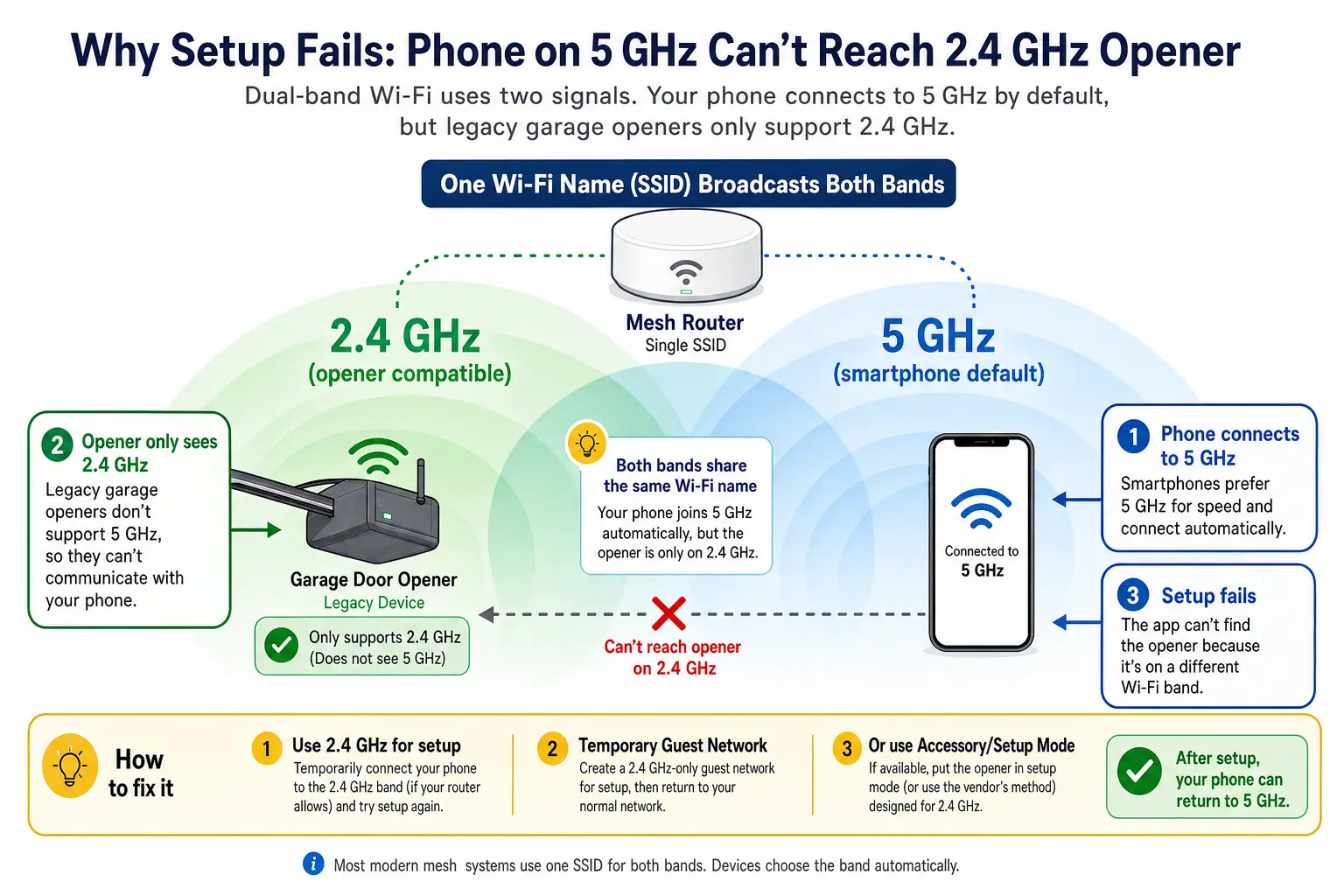
Visualizing how modern mesh routers merge 2.4 GHz and 5 GHz Wi-Fi into one network can cause smart garage door openers that only support 2.4 GHz to fail connecting, illustrating the core connectivity challenge.

Network and Physical Interference Barriers


Over 80% of smart garage door openers (including myQ, Meross, Refoss, and Tuya modules) rely on legacy 2.4 GHz Wi-Fi microcontrollers. These microcontrollers cannot communicate with 5 GHz frequencies or modern WPA3 encryption. When dual-band mesh systems (like eero, Google Nest Wi-Fi, or Netgear Orbi) broadcast 2.4 GHz and 5 GHz under a single network name (SSID), your smartphone defaults to the faster 5 GHz band during setup. As a result, the mobile app fails to hand over credentials to the 2.4 GHz garage unit, triggering false setup errors.

Physical environment also plays a critical role. Insulated steel doors, foil vapor barriers, and concrete block walls create a natural Faraday cage effect, dropping incoming wireless signals by -20 dBm to -35 dBm inside the garage. A signal reading as strong in your kitchen can drop below the minimum necessary threshold (-67 dBm) once the garage door closes.

Furthermore, non-shielded LED light bulbs placed inside the powerhead casing emit high electromagnetic noise in the 300 MHz to 1.5 GHz spectrum. Homeowners often ask: do led lights interfere with garage door openers? The answer is yes; unshielded LEDs create radio frequency (RF) noise that disrupts both 2.4 GHz Wi-Fi chips and remote transmitter frequencies.

Still stuck? Get it fixed today.
24/7 emergency service from licensed local technicians.
Call (860) 362-3018

Methodical Diagnostics for Smart Garage Connectivity


Resolving connection failures requires isolating physical bottlenecks from network handshakes.

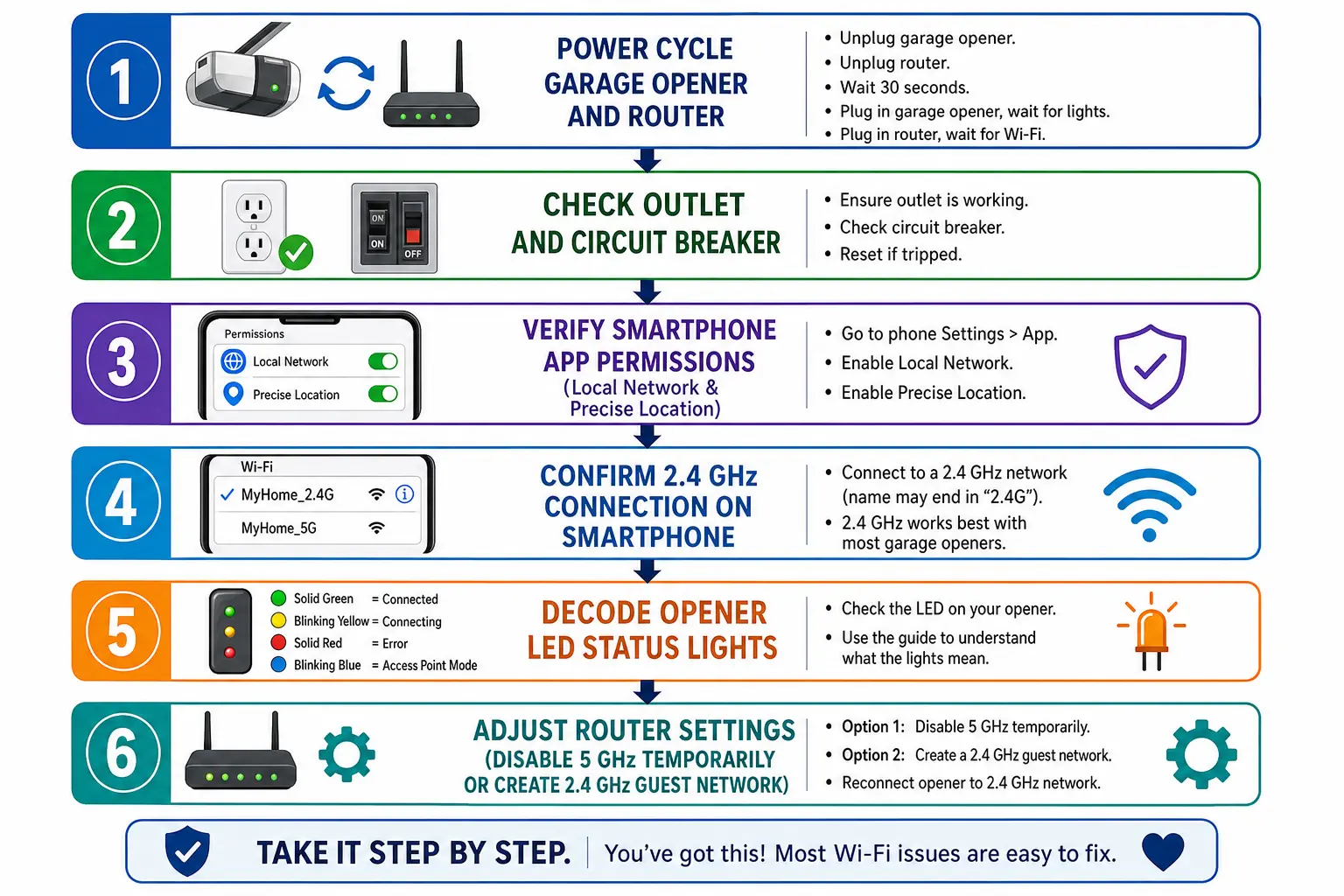
A clear, methodical guide to diagnosing common smart garage door opener Wi-Fi problems that empowers users to methodically restore connectivity with confidence.

Follow this step-by-step diagnostic workflow:

  1. Verify Smartphone OS Permissions: On iOS 14+ and Android 12+, navigate to your phone settings and ensure both Local Network Access and Precise Location are enabled for your smart app. Without these, the app cannot discover local Wi-Fi broadcast points.
  2. Execute Band Steering Bypass: If your mesh router does not allow temporary 5 GHz disabling, walk 50 to 75 feet away from your garage during setup. This forces your phone to drop off the shorter-range 5 GHz signal and latch onto the longer-range 2.4 GHz band before attempting pairing.
  3. Configure Router Security Parameters: Access your router gateway and switch security mode from WPA3-Auto to WPA2-PSK (AES). Confirm that AP Isolation / Client Isolation is disabled so your phone and opener can communicate.
  4. Assign a Static IP Reservation: To prevent lease drops after power outages, assign a permanent DHCP reservation for your opener’s MAC address in your router settings.

Following a clear wi-fi garage door setup routine ensures stable ongoing operation across network reboots.

Cross-Brand LED Diagnostic Matrix


Your opener’s physical LED indicators reveal precisely where the connection chain is breaking.

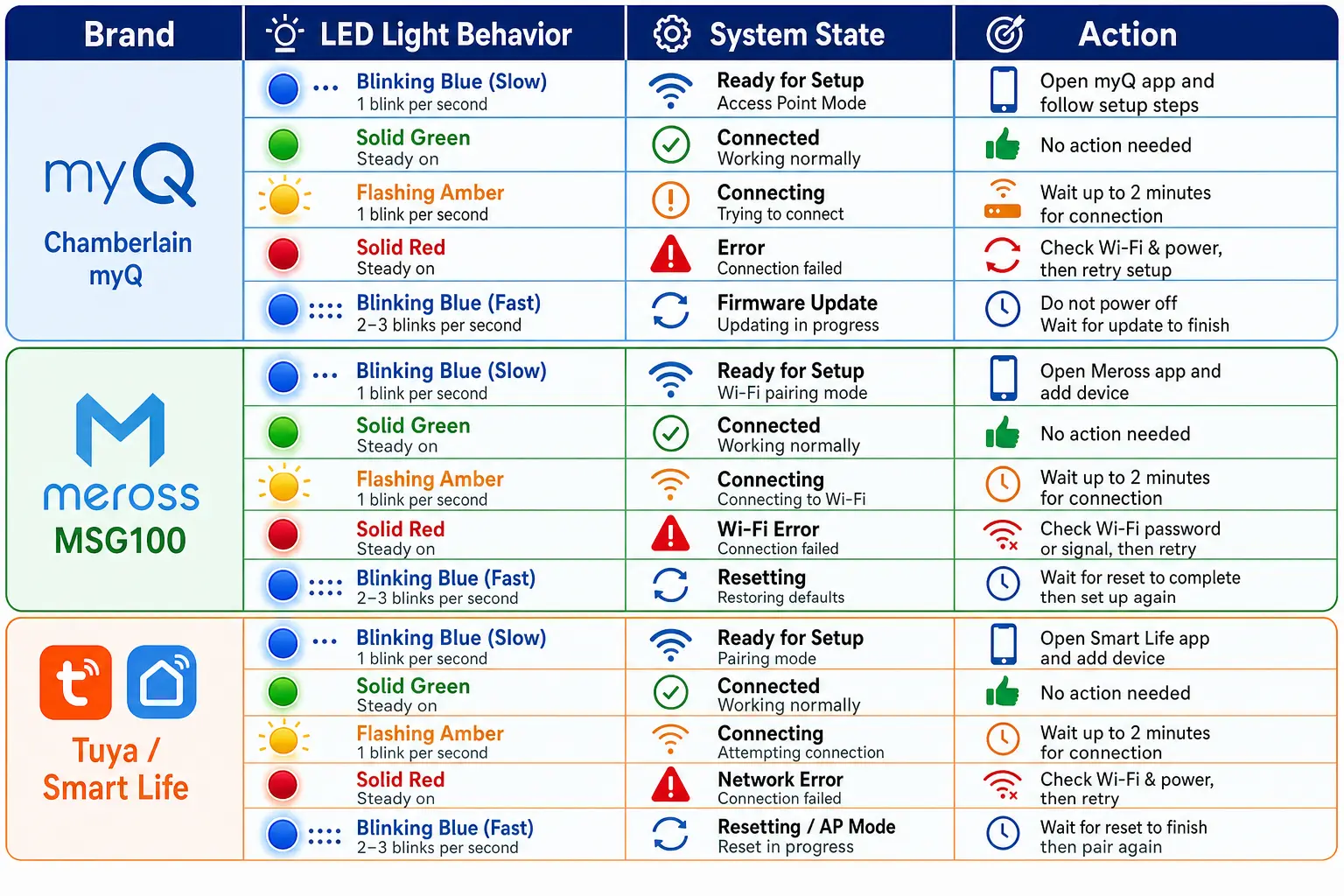
A memorably organized LED status guide to instantly recognize and interpret your smart garage door opener’s Wi-Fi connection state, reducing guesswork and speeding problem resolution.

Brand / Controller LED Behavior Root Cause System State Immediate Corrective Action
Chamberlain / myQ Blinking Blue Ready for Pairing Initiate app pairing sequence
Chamberlain / myQ Blinking Blue & Green Handshake In Progress Verify 2.4 GHz password match
Chamberlain / myQ Solid Green Fully Connected to Server Refresh mobile app / clear app cache
Meross MSG100 Solid Red Wi-Fi Signal Disconnected Check mesh band steering & router distance
Tuya / Smart Life Slow Blinking AP Pairing Mode Active Connect smartphone directly to module AP

If hardware lights refuse to turn on, you may need dedicated liftmaster garage door repair to address power supply or receiver board faults.

Evaluation Framework: Repair, Extend, or Retrofit?


When initial network tweaks fail, evaluate your options based on technical root causes:

  • Weak Garage RF Signal (-70 dBm or lower): Installing a dedicated 2.4 GHz guest network or an outdoor-rated mesh node bridges structural signal loss. Comparing a garage door opener vs wifi extender helps determine whether networking hardware or an external powerline adapter provides better coverage.
  • Defective Internal Wi-Fi Board: Replacing a main logic board can be costly. Wiring a $25 external smart relay module (e.g., Meross or Refoss) directly into the wall-button terminal bypasses a damaged onboard Wi-Fi chip while retaining full smart functionality.
  • Mechanical or Hardware Circuit Failure: Intermittent dropouts linked to opener power loss require professional garage door opener repair or a comprehensive large electric garage door failure analysis to inspect logic boards and wiring harnesses.

Expert Hardware Diagnostics When Technical Solutions Fail


Persistent connectivity drops often point to localized hardware issues, such as failing power supply capacitors, damaged logic boards, or severe signal degradation within the garage.

At 24H Garage Doors, our experienced technicians perform comprehensive hardware and diagnostic evaluations across Connecticut to identify the exact cause of your smart system issues. Contact our team today for dedicated local support, professional opener diagnostics, and reliable repairs tailored to your home.

Frequently Asked Questions


Why does my smart garage app say device offline when the opener light is solid green?

A solid green light indicates your garage door opener is successfully connected to your router and internet gateway. The “Device Offline” message in your smartphone app usually stems from cached app data, restricted background refresh settings, or OS-level permission blocks on your mobile device rather than a lost garage signal.

How do I connect a 2.4 GHz opener to a mesh router with only one network name?

You can temporarily force your smartphone onto the 2.4 GHz frequency by walking 50 to 75 feet away from your home router during initial setup, creating a temporary 2.4 GHz guest network in your router app, or pausing the 5 GHz band in your mesh router settings (available on systems like eero or Netgear Orbi) while pairing.

Can light bulbs inside the opener housing prevent Wi-Fi connections?

Yes. Standard, non-shielded LED light bulbs produce radio frequency noise in the 300 MHz to 1.5 GHz range. This electromagnetic interference disrupts internal 2.4 GHz antennas and remote control receivers. Replacing generic LEDs with RF-shielded or garage-door-rated LED bulbs immediately restores signal performance.

Contact / Request a Call