You’ve been there. You have a trusty old garage door remote and a shiny new one. The package promises a simple setup. You stand in your garage, following the vague instructions, trying to get the two remotes to talk to each other. You press buttons, hold them down, and… nothing. The frustration is real, and you’re left wondering, “Why is this so complicated?”
The truth is, it’s not you—it’s the technology. Getting one remote to program another isn’t about magic; it’s about matching the underlying security and frequency technologies. Most information online is scattered across brand-specific support pages from giants like Chamberlain and Genie, leaving you to piece together the puzzle.
This guide is different. We’re going to pull back the curtain and explain the fundamental reasons behind remote compatibility. By the end, you’ll understand why it works (or doesn’t) and be able to solve your programming puzzle with confidence.
Remote Compatibility for Garage Door Setup
Published: Jun 8, 2026 | Updated: Jul 28, 2026
Foundation: The Tech Explained Simply (Garage Remotes 101)
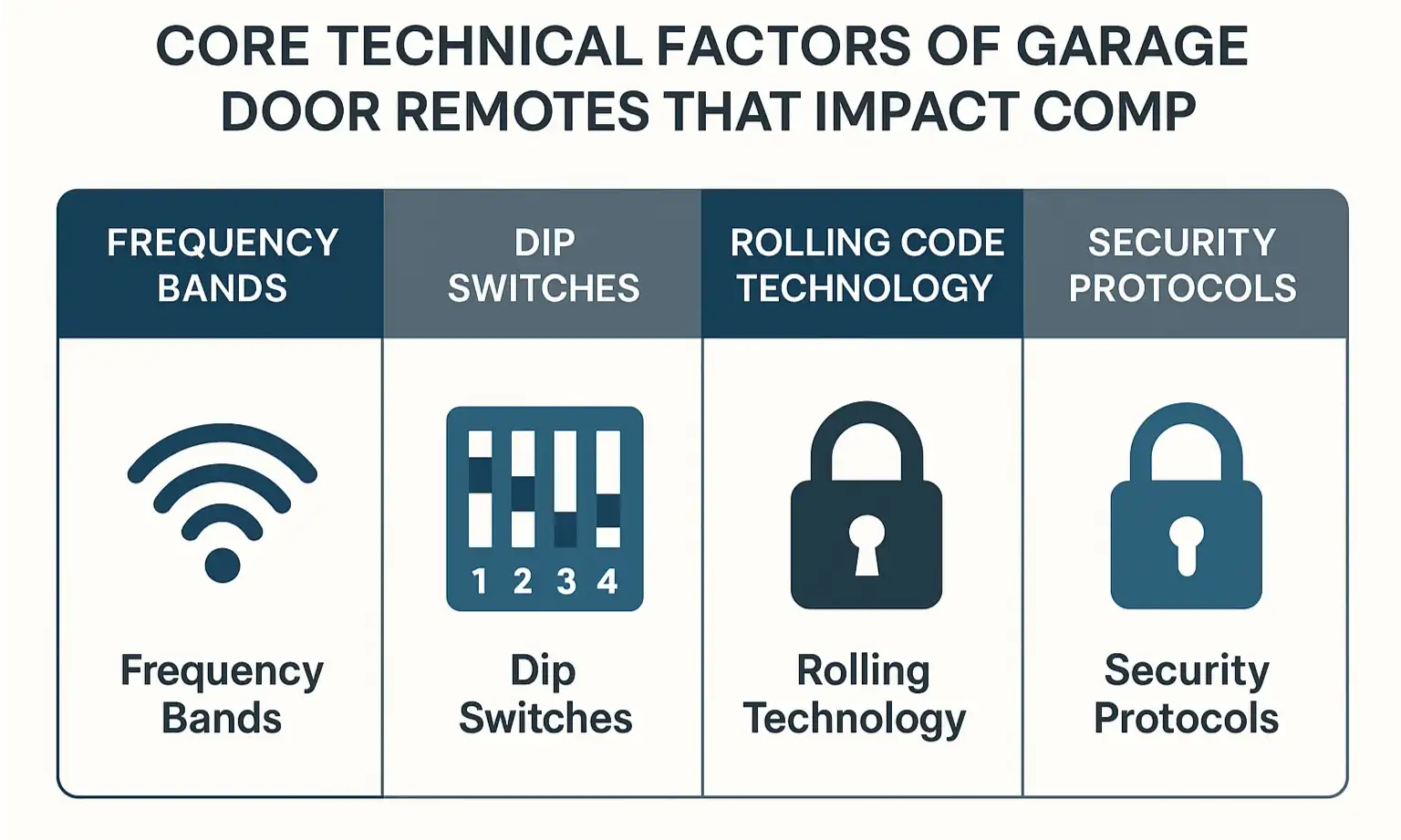
Before you can program anything, it helps to understand what’s happening behind the scenes. Think of your remote and your garage door opener as a private club with a very specific way of communicating. Compatibility depends on three key factors.
Frequencies: Tuning into Your Opener’s Radio Station
Every garage door system operates on a specific radio frequency, much like a car radio tunes into a station. The most common frequencies in the U.S. are 315 MHz, 390 MHz, and 310 MHz. If your new remote is trying to broadcast on a different “station” than your opener is listening for, they’ll never connect. It’s the most basic requirement for communication.
Security Protocols: The Secret Handshake
Once the remotes are on the same frequency, they need to know the secret handshake. This is where security technology comes in, and it’s typically one of two types:
Building: The 'Learn Button' Breakthrough: Your Compatibility Shortcut
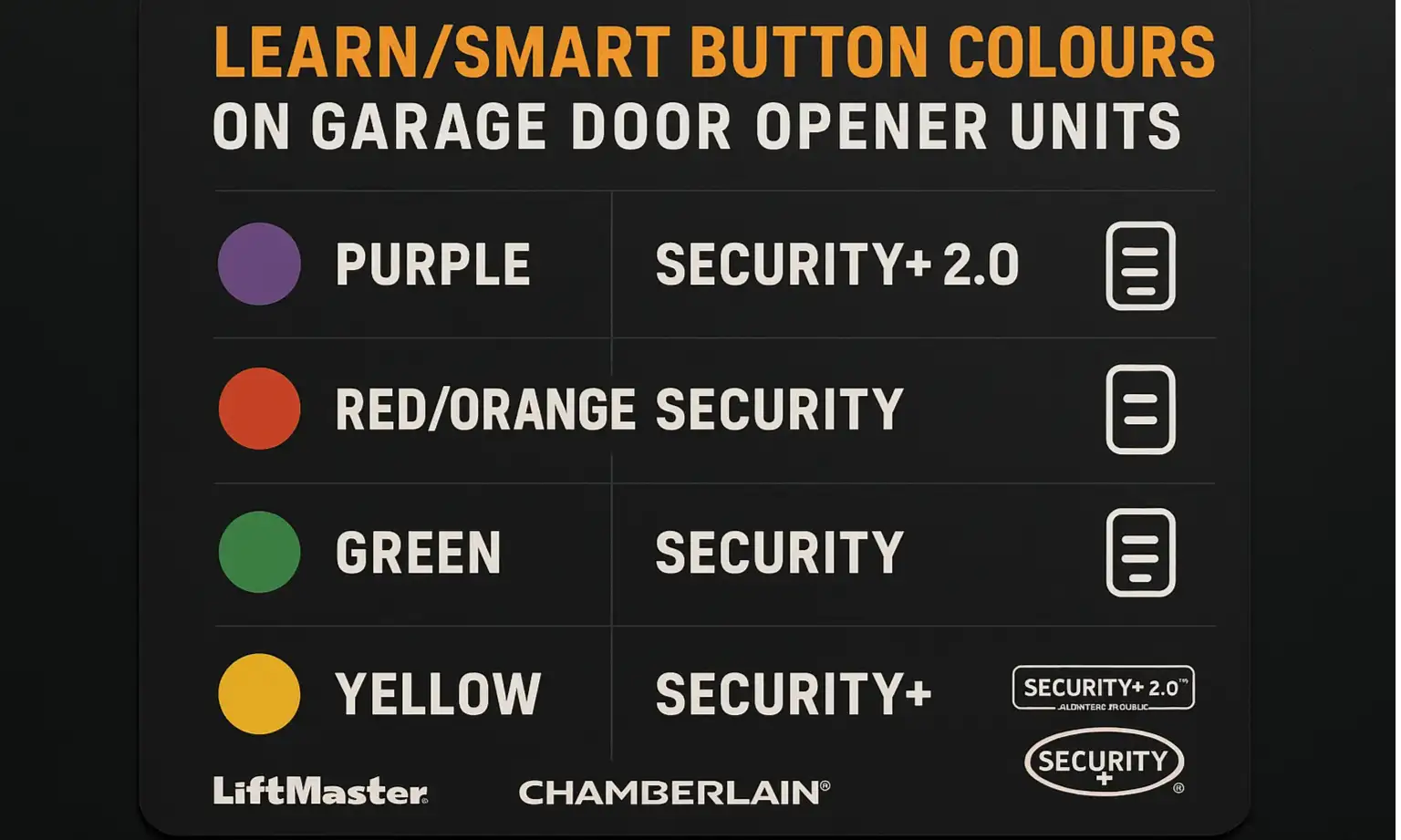
So, how can you tell what kind of technology your opener uses without taking it apart? This is the big secret the pros use: look at the “Learn” button on the motor unit. The color of this single button tells you almost everything you need to know about its security protocol.
Manufacturers like LiftMaster, Chamberlain, and Craftsman have used this color-coding system for decades. It’s the single most reliable visual cue for identifying your system’s technology.
Finding this button is your first step to success. If you’re unsure where is the learn button on garage door opener, it’s usually on the back or side of the motor unit, often near a small LED light.
Mastery: The Ultimate Compatibility Reference
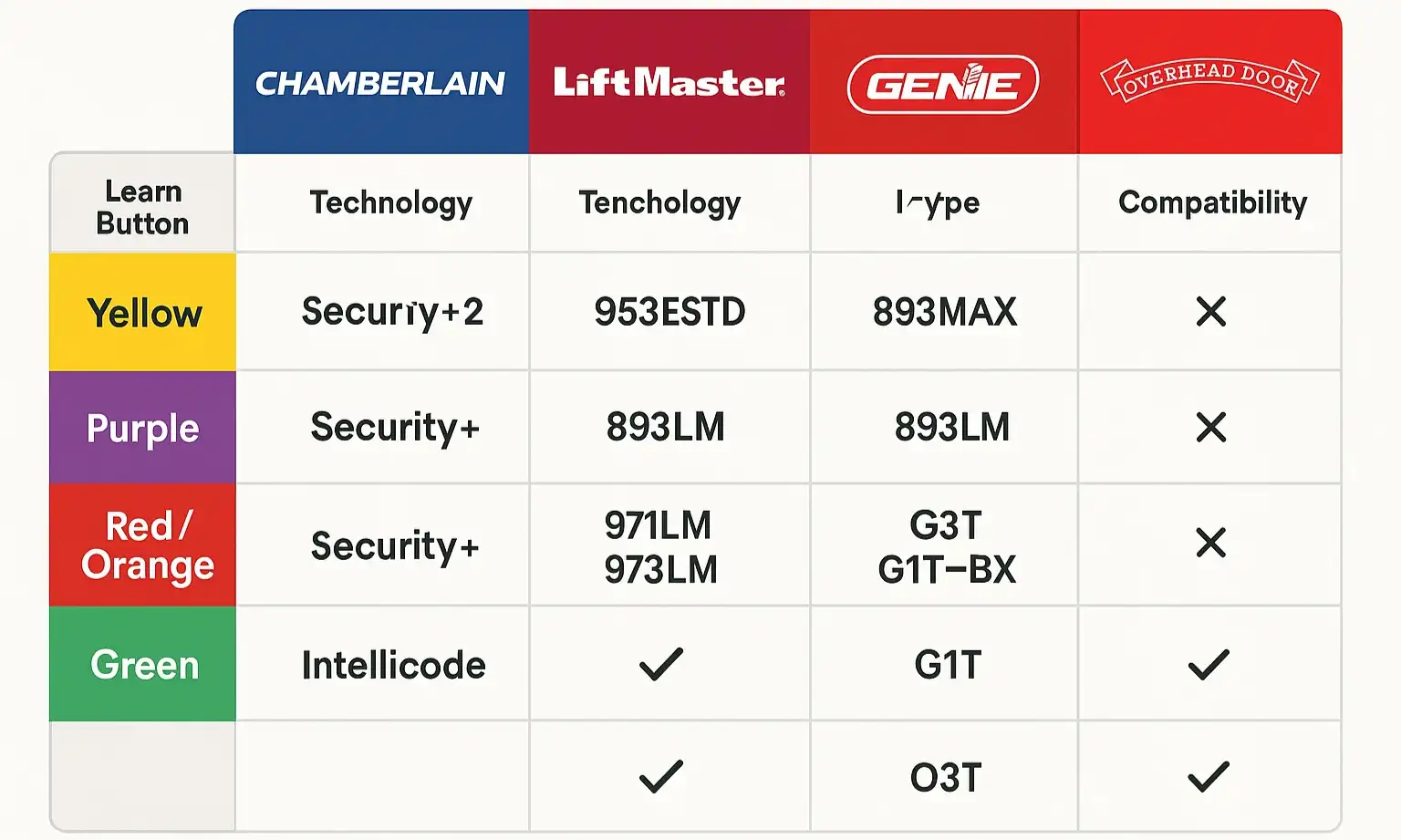
Now that you’ve identified your learn button color, you can put it all together. The chart below synthesizes the fragmented information from across the web into one simple, brand-agnostic reference. Use it to match your opener’s technology with the type of remote you need.
This is why “universal” remotes can be so tricky. A universal remote isn’t truly universal; it’s a multi-protocol device. If your opener uses a proprietary technology that the universal remote doesn’t support (like certain systems from Marantec or Wayne Dalton), it will never work. Before you learn how to program a universal remote, you must first confirm it’s compatible with your learn button color.
This is why “universal” remotes can be so tricky. A universal remote isn’t truly universal; it’s a multi-protocol device. If your opener uses a proprietary technology that the universal remote doesn’t support (like certain systems from Marantec or Wayne Dalton), it will never work. Before you learn how to program a universal remote, you must first confirm it’s compatible with your learn button color.
Action: Your Step-by-Step Guide and Troubleshooting Flowchart
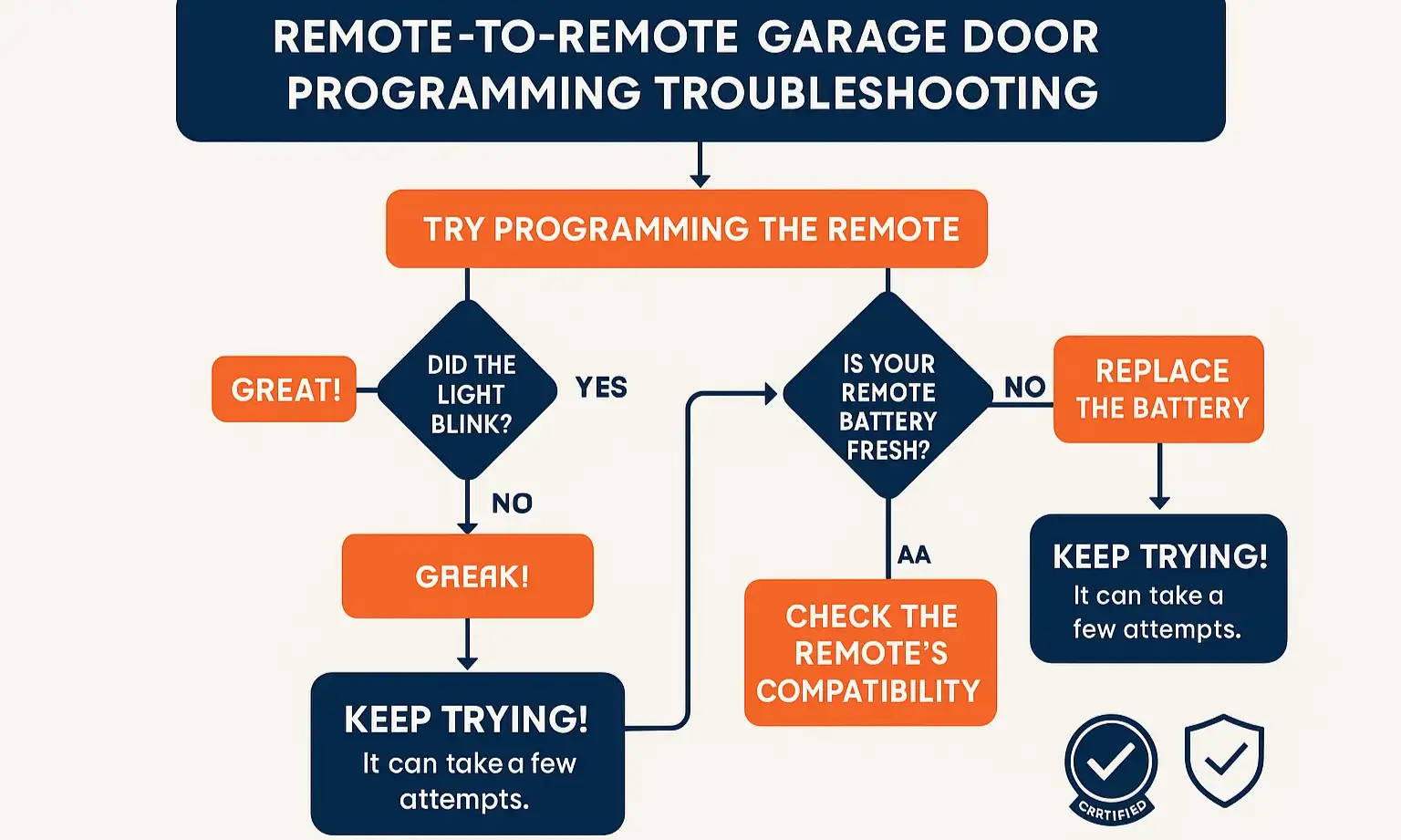
Armed with this knowledge, you’re ready to try programming again. While the exact steps can vary, the general process for syncing remotes that use rolling code technology is similar. For a detailed walkthrough, check out our guide on how to program a garage door remote from another remote.
But what if it still doesn’t work? Don’t get discouraged. Remote programming can be finicky. Use the visual flowchart below to diagnose common issues.
Sometimes, the problem isn’t the remote at all. Signal interference from LED light bulbs or other wireless devices can block communication. If you suspect this is the case, you may need to learn how to fix garage door remote signal issues. And if multiple remotes suddenly stop working, it could be a sign you need to repair garage door opener logic board itself.
But what if it still doesn’t work? Don’t get discouraged. Remote programming can be finicky. Use the visual flowchart below to diagnose common issues.
Sometimes, the problem isn’t the remote at all. Signal interference from LED light bulbs or other wireless devices can block communication. If you suspect this is the case, you may need to learn how to fix garage door remote signal issues. And if multiple remotes suddenly stop working, it could be a sign you need to repair garage door opener logic board itself.
Frequently Asked Questions (FAQ)
Why can’t I clone my old remote to my new universal remote?
Cloning typically only works with older, fixed-code dip switch systems. Modern rolling code remotes are designed to prevent cloning for security reasons. Instead of cloning, you must “enroll” the new remote directly with the main garage door opener motor unit using the “Learn” button.
Can I use a Genie remote with a LiftMaster opener?
Generally, no. While some universal remotes can bridge this gap, a brand-specific remote (like one from Genie) is designed to communicate only with openers from the same manufacturer. They use proprietary versions of rolling code technology that are not interchangeable.
What if I can’t find a model number or learn button on my opener?
If your opener is very old or the labels are worn off, identifying it can be tough. Your best bet is to open the casing of an existing, working remote. If you see a bank of small dip switches, you have a fixed-code system. If not, it’s likely a rolling code system, and you may need professional help to identify the specific type.
Does my car’s built-in garage door opener (HomeLink) have the same compatibility issues?
Yes, absolutely. The HomeLink system in your vehicle is essentially a universal remote. It needs to be programmed to match your opener’s specific frequency and rolling code protocol. Understanding your opener’s learn button color is just as important for programming your car garage door opener as it is for a handheld remote.
From Confused to Confident
Navigating the world of garage door remote compatibility doesn’t have to be a guessing game. By understanding the core technologies of frequency and security, and by using the “learn button” as your guide, you can confidently choose the right remote and program it successfully. You’ve moved from simply following instructions to understanding the reason behind them.
If you’ve followed this guide and are still facing challenges, don’t hesitate to reach out. Sometimes a system has unique quirks that require an expert eye. Our team is always ready to help you find a solution and ensure your garage door system works seamlessly and securely.
If you’ve followed this guide and are still facing challenges, don’t hesitate to reach out. Sometimes a system has unique quirks that require an expert eye. Our team is always ready to help you find a solution and ensure your garage door system works seamlessly and securely.
Frequently Asked Questions
Why can't I clone my old remote to my new universal remote?
Cloning typically only works with older, fixed-code dip switch systems. Modern rolling code remotes are designed to prevent cloning for security reasons. Instead of cloning, you must “enroll” the new remote directly with the main garage door opener motor unit using the “Learn” button.
Can I use a Genie remote with a LiftMaster opener?
Generally, no. While some universal remotes can bridge this gap, a brand-specific remote (like one from Genie) is designed to communicate only with openers from the same manufacturer. They use proprietary versions of rolling code technology that are not interchangeable.
What if I can't find a model number or learn button on my opener?
If your opener is very old or the labels are worn off, identifying it can be tough. Your best bet is to open the casing of an existing, working remote. If you see a bank of small dip switches, you have a fixed-code system. If not, it’s likely a rolling code system, and you may need professional help to identify the specific type.
Does my car's built-in garage door opener (HomeLink) have the same compatibility issues?
Yes, absolutely. The HomeLink system in your vehicle is essentially a universal remote. It needs to be programmed to match your opener’s specific frequency and rolling code protocol. Understanding your opener’s learn button color is just as important for programming your car garage door opener as it is for a handheld remote.